yottacode and GitHub Integrations: Ship From Issue to PR Without Leaving Your Terminal
GitHub is where most software work becomes real: issues describe what needs to change, branches hold the implementation, pull requests carry the review, and CI decides whether the work is ready to merge.
yottacode brings that GitHub loop directly into your terminal. Instead of bouncing between shell commands, browser tabs, issue pages, PR forms, and review screens, you can ask yottacode to inspect the repo, reason about the change, run the right git operation, and prepare the GitHub artifact for you.
Watch the walkthrough:
GitHub operations as first-class agent workflows
yottacode’s GitHub integration is built around slash commands that match the way developers already ship code. You can invoke those slash commands directly as part of CI/CD pipelines and workflows, or use natural language to ask yottacode to run the same git and GitHub operations.
Depending on your comfort level, you can also allow specific git commands in the permission list so the agent does not ask for approval every time.
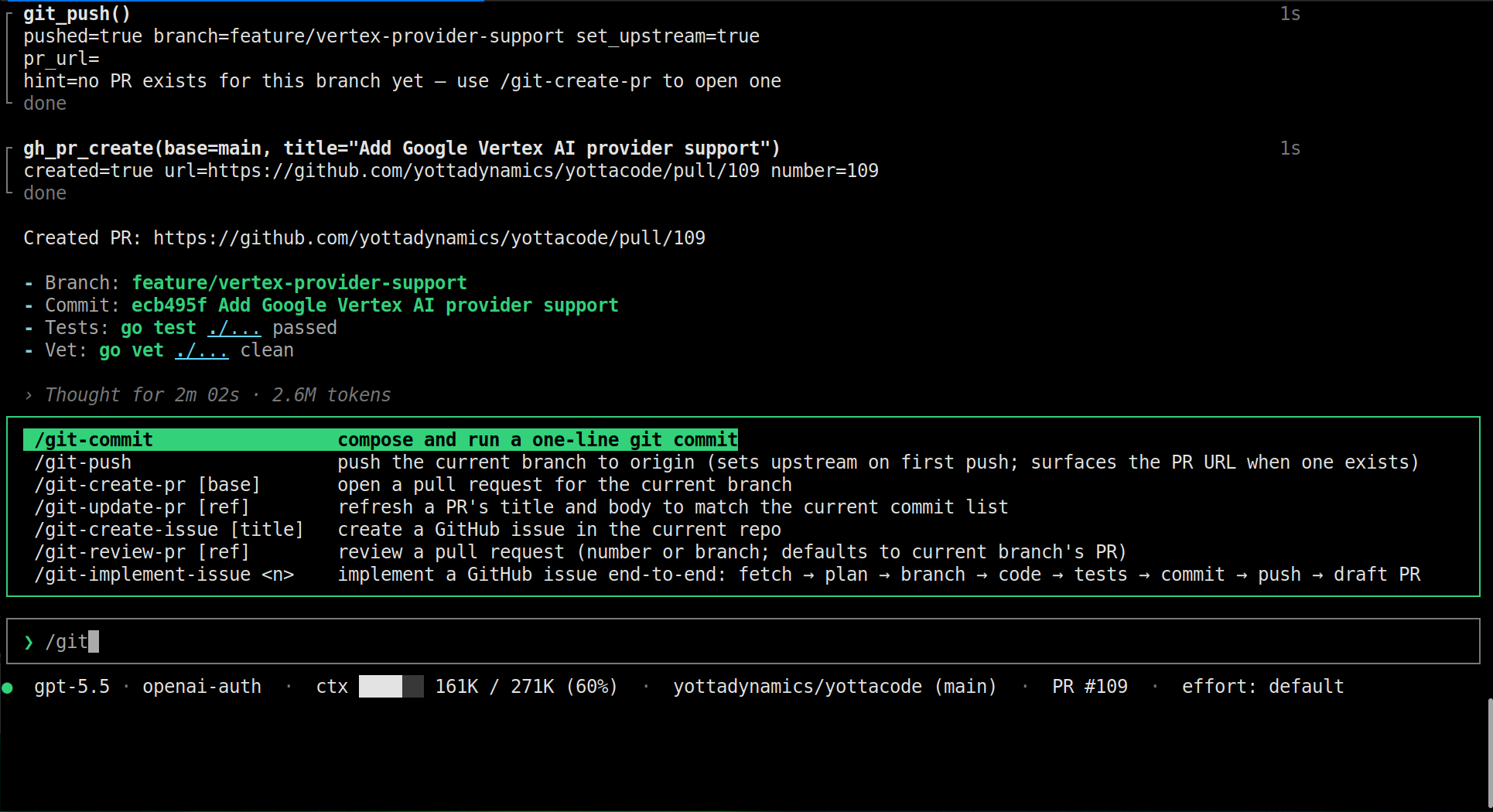
The current git and GitHub command set includes:
| Command | What it does |
|---|---|
/git-commit | Composes and runs a one-line git commit. |
/git-push | Pushes the current branch to origin, sets upstream on first push, and surfaces the PR URL when one exists. |
/git-create-pr [base] | Opens a pull request for the current branch. |
/git-update-pr [ref] | Refreshes a PR’s title and body to match the current commit list. |
/git-create-issue [title] | Creates a GitHub issue in the current repo. |
/git-review-pr [ref] | Reviews a pull request by number or branch, defaulting to the current branch’s PR. |
/git-implement-issue <n> | Implements a GitHub issue end-to-end: fetch, plan, branch, code, tests, commit, push, and draft PR. |
These are not just aliases for shell commands. They are structured workflows that let the agent gather context, draft the right message, ask for approval where needed, and keep the work tied to the repository state.
Commit and push with context
A good commit message should describe what changed without forcing you to manually summarize every staged hunk.
With /git-commit, yottacode reads the staged diff, checks the branch context, looks at recent commit style, and proposes a concise one-line subject before running the commit. That keeps commits consistent while still leaving the final action under your control.
Then /git-push handles the next step: pushing the current branch, setting the upstream when the branch is new, and showing the related PR URL when GitHub already has one.
Create and update pull requests from the terminal
Opening a PR usually means collecting the commit list, describing the change, checking the base branch, and writing a reviewable summary. /git-create-pr [base] turns that into a guided terminal flow.
yottacode gathers the branch diff, commit log, and repository PR template, then drafts a title and body that explain what changed and why. If the branch is already under review, /git-update-pr [ref] refreshes the title and body so the PR stays aligned with the latest commits instead of drifting from reality.
That matters on real work. PR descriptions often go stale after the second or third revision. yottacode can keep the PR narrative synchronized with the code.
Create issues while the context is still fresh
When you discover a bug, missing test, or follow-up improvement during development, the best time to capture it is immediately.
/git-create-issue [title] lets yottacode draft a GitHub issue from the current repository context. It can use the local issue template when one exists, add the details that matter, and create the issue without making you leave the terminal.
This is especially useful when a fix uncovers a larger design cleanup that should not be bundled into the current PR.
Review pull requests with an agent that reads the diff
/git-review-pr [ref] gives yottacode the PR metadata, diff, and check status so it can review the change like a careful teammate. It looks for correctness issues, missing tests, unclear behavior, and risky edge cases.
The goal is not to replace human review. The goal is to catch the obvious and non-obvious problems before a human has to spend attention on them.
Implement a GitHub issue end-to-end
The most powerful workflow is /git-implement-issue <n>.
Give yottacode an issue number and it can:
- Fetch the issue and recent discussion.
- Build an implementation plan.
- Create an isolated branch.
- Edit the code.
- Add or update tests.
- Run verification.
- Commit the result.
- Push the branch.
- Open a draft pull request.
That turns GitHub issues into executable work orders while preserving the normal review path your team already uses.
Designed for developer control
GitHub automation should not mean silent automation.
yottacode keeps the developer in the loop with approval-gated operations, visible diffs, branch-aware git behavior, and explicit PR or issue drafts before they are posted. The agent can do the repetitive work, but you still decide what lands in the repository.
That balance is the point: faster GitHub workflows without giving up review, traceability, or control.
Try it in your repo
Install yottacode, open a repository with GitHub issues or pull requests, and try the workflow that matches where you are:
# Review the current branch's PR
yottacode
/git-review-pr

# Create a pull request from the current branch
/git-create-pr

# Implement an issue end-to-end
/git-implement-issue 42
yottacode is built for the full development loop: understand the task, change the code, test it, commit it, and move it through GitHub.
- GitHub: yottadynamics/yottacode
- Docs: yottacode.ai/docs
- Video walkthrough: yottacode GitHub integrations
— The YottaDynamics Team